Tuesday, March 18, 2025

Protocols in Application Layer : What are Application Layer Protocols? TELNET,FTP,TFTP,SMTP

 The Application Layer is the topmost layer in the Open System Interconnection (OSI) model. This layer provides several ways for manipulating the data which enables any type of user to access the network with ease. The Application Layer interface directly interacts with the application and provides common web application services. The application layer performs several kinds of functions that are required in any kind of application or communication process. In this article, we will discuss various application layer protocols.

What are Application Layer Protocols?

Application layer protocols are those protocols utilized at the application layer of the OSI (Open Systems Interconnection) and TCP/IP models. They facilitate communication and data sharing between software applications on various network devices. These protocols define the rules and standards that allow applications to interact and communicate quickly and effectively over a network.


Application Layer Protocol in Computer Network

1. TELNET

Tuesday, March 11, 2025

How to use Get-MgGroupMember in Powershell | What Is the Get-MgGroupMember PowerShell Command?

 Managing group memberships in Microsoft 365 is an important task for IT admins, especially in large organizations where access control is a priority.

The Get-MgGroupMember cmdlet in Microsoft Graph PowerShell makes it easy to pull a list of all direct members of a group, whether they’re users, devices, or service principals.

In this guide, we’ll walk you through using Get-MgGroupMember step by step, from installation to exporting results, so you can streamline your workflow and keep your groups organized!


What Is the Get-MgGroupMember PowerShell Command?

Get-MgGroupMember is a Microsoft Graph PowerShell cmdlet that retrieves the direct members of a specified Microsoft 365 group.

These members can include users, devices, service principals, organizational contacts, or even other groups. However, it doesn’t return nested or transitive members—only those directly assigned to the group.

Monday, February 17, 2025

DHCP Guide : The background,The DHCP Process,Central DHCP Server,Local DHCP Server

            This document describes common scenarios for implementing DHCP in relation to PXE boot, focusing on Configuration Manager.

The audience must be familiar with basic IP networking principles.

The background:


            For a client to perform a PXE boot, there must be a DHCP service available, this is not required to be a Microsoft DHCP service. Any DHCP server is good.

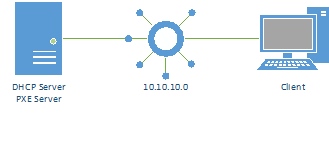
The following diagram shows a typical network setup

In this case the client and the server are on the same network, which is the simplest setup you will come across, normally the setup will be more advanced, but to explain the basics, we will start with this simple model.

The DHCP Process:


            During a normal DHCP process, the following happens:

  1. The client sends out a DHCP broadcast on the network
  2. The broadcast is picked up by the server
  3. The server replies with a broadcast containing the MAC address of the client and a suggested IP address
  4. The client replies back to the server, indicating that it will use the provided address

The PXE Boot process:

Wednesday, February 12, 2025

Outlook Scheduling Assistant Missing? Here’s the Fix : 3 Common Reasons Why Outlook Scheduling Assistant is Missing

Managing time, schedules, and meetings inside an organization is not always easy.

Fortunately, Microsoft Office includes many different features that allow users to schedule a meeting, check out available times, and successfully find rooms by following a quick process.

The Outlook Scheduling Assistant is a handy option that should appear on the ribbon as soon as you open Outlook.

Therefore, if you can’t find the Scheduling Assistant, continue reading to learn how to fix the Outlook Scheduling Assistant missing error on your device.


3 Common Reasons Why Outlook Scheduling Assistant is Missing:

According to Microsoft, the Scheduling Assistant icon should appear on Outlook’s ribbon just by having the default user’s permission enabled.

This way, you can create and set up appointments with your coworkers and colleagues by simply following the assistant’s instructions.

However, if you cannot use the assistant because the icon is not working properly, then this error might be caused due to three possible reasons.

Wednesday, February 5, 2025

Data Structures: What is Data Structure?Classification of Data Structure,Linear Data Structure

Data structures are the fundamental building blocks of computer programming. They define how a program organizes, stores, and manipulates data. Understanding data structures is very important for developing efficient and effective algorithms.

This tutorial will explore the most commonly used data structures, including arrays, linked lists, stacks, queues, trees, and graphs.

What is Data Structure?

A data structure is a storage that is used to store and organize data. It is a way of arranging data on a computer so that it can be accessed and updated efficiently.

A data structure is not only used for organizing the data. It is also used for processing, retrieving, and storing data. Different basic and advanced types of data structures are used in almost every program or software system that has been developed. So we must have good knowledge of data structures. 

Classification of Data Structure:


  1. Linear Data Structure: A data structure in which data elements are arranged sequentially or linearly, where each element is attached to its previous and next adjacent elements, is called a linear data structure. 

Monday, January 27, 2025

Voice Search Statistics for 2025: Usage & Growth Trends, How Many People Use Voice Assistants?

Voice search is on the rise. Around 20% of people globally use voice search, and 8.4 billion voice assistants are circulating. 

Approximately 11.5% of American adults with smart speakers use them to buy things every month.  

More and more people are using voice search because it’s faster and easier to talk to your phone than to type.

In this post, we’ll dive into key voice search statistics, such as global and U.S. adoption rates, and explore the increasing popularity of voice assistants worldwide.

How Many People Use Voice Assistants?

Voice assistants are now a big part of how we live, and more and more people worldwide are using them. Here are five stats that show this is happening.

1. By the end of 2024, the number of voice assistants worldwide is projected to reach 8.4 billion, surpassing the global population. (Juniper Research)

2. More Americans will use voice assistants in the future. eMarketer predicts that 162.7 million Americans will use voice assistants by 2027, compared to 149.1 million in 2024.

Tuesday, January 21, 2025

Client-Server Model : How Does the Client-Server Model Work? How does the Browser interact with the Servers?

The Client-server model is a distributed application structure that partitions tasks or workloads between the providers of a resource or service, called servers, and service requesters called clients. In the client-server architecture, when the client computer sends a request for data to the server through the internet, the server accepts the requested process and delivers the data packets requested back to the client. Clients do not share any of their resources. Examples of the Client-Server Model are Email, World Wide Web, etc.

How Does the Client-Server Model Work?

In this article, we are going to take a dive into the Client-Server model and have a look at how the Internet works via, web browsers. This article will help us have a solid WEB foundation and help us easily work with WEB technologies.

  • Client: When we say the word Client, it means to talk of a person or an organization using a particular service. Similarly in the digital world, a Client is a computer (Host) i.e. capable of receiving information or using a specific service from the service providers (Servers).
  • Servers: Similarly, when we talk about the word Servers, It means a person or medium that serves something. Similarly in this digital world, a Server is a remote computer that provides information (data) or access to particular services.


So, it is the Client requesting something and the Server serving it as long as it is in the database.

How does the Browser interact with the Servers?


  • The user enters the URL(Uniform Resource Locator) of the website or file. The Browser then requests the DNS(DOMAIN NAME SYSTEM) Server.
  • DNS Server lookup for the address of the WEB Server.
  • The DNS Server responds with the IP address of the WEB Server.
  • The Browser sends over an HTTP/HTTPS request to the WEB Server’s IP (provided by the DNS server).
  • The Server sends over the necessary files for the website.
  • The Browser then renders the files and the website is displayed. This rendering is done with the help of a DOM (Document Object Model) interpreter, CSS interpreter, and JS Engine collectively known as the JIT or (Just in Time) Compilers.
Client-Server-Model

Client Server Request and Response

Advantages of the Client-Server Model

  • Centralized system with all data in a single place.
  • Cost efficiency requires less maintenance cost and Data recovery is possible.
  • The capacity of the Client and Servers can be changed separately.

Disadvantages of Client-Server Model

  • Clients are prone to viruses, Trojans, and worms if present in the Server or uploaded into the Server.
  • Servers are prone to Denial of Service (DOS) attacks.
  • Data packets may be spoofed or modified during transmission.
  • Phishing or capturing the user's login credentials or other useful information are common and MITM(Man in the Middle) attacks are common.

Conclusion

The client-server architecture consolidates resources on servers for greater control and security, allows for flexible client options, and relies on a robust network for scalability and efficiency. While there are cost implications, the client-server model remains fundamental and has been shaped by trends such as cloud computing.

===========================================================

"This Content Sponsored by Buymote Shopping app

BuyMote E-Shopping Application is One of the Online Shopping App

Now Available on Play Store & App Store (Buymote E-Shopping)

Click Below Link and Install Application: https://buymote.shop/links/0f5993744a9213079a6b53e8

Sponsor Content: #buymote #buymoteeshopping #buymoteonline #buymoteshopping #buymoteapplication"

============================================================================

Youtube Channel Image
Nadaipazhagu Tamizhaa Subscribe To watch Videos
Subscribe