Showing posts with label Cloud Technologies. Show all posts

Monday, July 14, 2025

How Smartphones Work : The Anatomy of a Smartphone: Hardware Components, Operating System: The Brain Behind the Interface, Battery Management and Power Efficiency

Smartphones have become an essential part of our daily lives. We use them for communication, entertainment, navigation, education, business, and more. But have you ever wondered how they actually work? This article breaks down the inner workings of a smartphone under seven key sections to help you understand the amazing technology behind the device in your pocket.

The Anatomy of a Smartphone: Hardware Components

At the heart of every smartphone is a collection of hardware components working in harmony. These include:

  • Processor (CPU and GPU): The central processing unit (CPU) acts like the brain of the smartphone. It handles most computing tasks, while the graphics processing unit (GPU) deals with rendering visuals.

  • Memory (RAM): RAM stores temporary data and supports multitasking. The more RAM, the smoother the performance.

  • Storage (ROM): This is where your apps, photos, videos, and system files are stored. It's often measured in gigabytes (GB) or terabytes (TB).

  • Battery: Most smartphones use lithium-ion batteries, which are rechargeable and designed to last a day or more depending on usage.

  • Display: Modern smartphones use OLED or AMOLED displays that provide vibrant colors and consume less power.

  • Camera: Includes one or more lenses with sensors for photography and video. AI now assists with features like image stabilization and portrait mode.

  • Sensors: Accelerometers, gyroscopes, proximity sensors, ambient light sensors, and fingerprint readers all help enhance user interaction.

Wednesday, July 9, 2025

Introduction to Cloud Service Providers : Microsoft Azure, Google Cloud Platform (GCP), Choosing the Right Cloud Provider

Cloud computing has revolutionized the way businesses and individuals access and use computing resources. At the heart of this transformation are Cloud Service Providers (CSPs)—companies that deliver computing services like servers, storage, databases, networking, software, and analytics over the internet (“the cloud”). These services enable users to scale their IT needs without investing in physical infrastructure, offering cost savings, flexibility, and speed.

The most prominent cloud service providers include Amazon Web Services (AWS), Microsoft Azure, and Google Cloud Platform (GCP). Others like IBM Cloud, Oracle Cloud, and Alibaba Cloud also serve specific markets and enterprise needs. Understanding what these providers offer, their differences, and how they’re used is essential for anyone exploring cloud computing.

Major Cloud Service Providers: An Overview

Amazon Web Services (AWS)

Launched in 2006, AWS is the pioneer and market leader in cloud computing. It offers a wide array of services, including EC2 (compute), S3 (storage), RDS (relational databases), Lambda (serverless functions), and many more. AWS serves millions of customers globally and has the broadest geographic reach with data centers in multiple availability zones and regions.

Microsoft Azure

Azure is a strong contender, particularly appealing to enterprises already using Microsoft products. Azure provides seamless integration with tools like Microsoft 365, SharePoint, and Active Directory. It offers services for virtual machines, SQL databases, AI, DevOps, and analytics, and is widely adopted by government and financial sectors.

Google Cloud Platform (GCP)

GCP is known for its strengths in data analytics, machine learning (e.g., BigQuery, TensorFlow), and containerization (e.g., Kubernetes, which Google originally developed). It appeals to startups, developers, and data scientists due to its developer-friendly tools and AI/ML capabilities.

Cloud Service Models (IaaS, PaaS, SaaS)

Cloud service providers typically offer services under three main models:

Infrastructure as a Service (IaaS): Provides virtualized computing resources like virtual machines, storage, and networks. Examples: AWS EC2, Azure Virtual Machines, GCP Compute Engine.

Platform as a Service (PaaS): Offers platforms for developers to build, run, and manage applications without managing infrastructure. Examples: AWS Elastic Beanstalk, Azure App Service, GCP App Engine.

Software as a Service (SaaS): Delivers software applications over the internet on a subscription basis. Examples include Microsoft 365, Google Workspace, and Salesforce.

Each provider supports these models, though their depth and specialization may vary. Organizations often mix and match based on their needs.

Key Differences and Unique Features

While all cloud providers offer core services like computing, storage, and networking, their approaches, tools, and ecosystems differ:

AWS is known for its vast service offerings and maturity. It supports nearly every industry use case and has deep integrations for enterprise and startup environments alike. Its pricing model can be complex, but it offers a wide range of cost-saving tools.

Azure stands out for its hybrid cloud capabilities, especially with Azure Stack, which allows on-premises environments to integrate with the cloud. It’s highly favored by companies already invested in the Microsoft ecosystem.

GCP excels in data analytics and artificial intelligence. It’s often the go-to choice for big data solutions and innovation in areas like machine learning, serverless computing, and containers.

Other providers like IBM Cloud focus heavily on AI and blockchain, Oracle Cloud on enterprise database solutions, and Alibaba Cloud on the Asian market, especially China.

Choosing the Right Cloud Provider

Selecting a cloud provider depends on several factors, including:

Business Needs: A startup focusing on rapid app development might prefer GCP for its scalability and DevOps tools, while an enterprise with legacy systems might opt for Azure.

Pricing: AWS offers extensive options but can be costly and complex. GCP is generally seen as cost-effective for data and compute-heavy workloads.

Compliance and Security: Azure and AWS both offer robust compliance for industries like healthcare and finance. If your organization has specific regional or legal data requirements, location and compliance support become critical.

Ecosystem and Support: Microsoft-centric companies may find Azure easier to integrate. AWS offers the largest third-party marketplace, while GCP focuses on open-source and academic-friendly tools.

Multi-cloud and Hybrid Cloud: Many organizations now use a multi-cloud approach to reduce dependency on a single provider or to leverage the unique strengths of each. Hybrid cloud solutions (e.g., Azure Arc, AWS Outposts) allow companies to operate across on-premise and cloud environments.

Future Trends and Conclusion

The cloud services market is constantly evolving. Key trends include:

Serverless Computing: All major providers now offer serverless platforms to improve scalability and reduce management overhead.

AI and Machine Learning: Integration of AI/ML tools is becoming standard, with providers competing to offer better, more accessible APIs and tools.

Edge Computing: Providers are expanding into edge computing to support low-latency applications like IoT and AR/VR.

Sustainability: Green cloud computing is gaining importance, with providers investing in carbon-neutral data centers and renewable energy.

In conclusion, cloud service providers are at the center of today’s digital transformation. Whether it's AWS’s breadth of services, Azure’s enterprise integration, or GCP’s innovation in AI, each has its strengths. Understanding your organization’s specific goals and needs is key to making the right choice—and staying agile in the ever-changing cloud landscape.

===============================================================


"This Content Sponsored by SBO Digital Marketing.

Mobile-Based Part-Time Job Opportunity by SBO!

Earn money online by doing simple content publishing and sharing tasks. Here's how:

  • Job Type: Mobile-based part-time work
  • Work Involves:
    • Content publishing
    • Content sharing on social media
  • Time Required: As little as 1 hour a day
  • Earnings: ₹300 or more daily
  • Requirements:
    • Active Facebook and Instagram account
    • Basic knowledge of using mobile and social media

For more details:

WhatsApp your Name and Qualification to 9994104160

a.Online Part Time Jobs from Home

b.Work from Home Jobs Without Investment

c.Freelance Jobs Online for Students

d.Mobile Based Online Jobs

e.Daily Payment Online Jobs

Keyword & Tag: #OnlinePartTimeJob #WorkFromHome #EarnMoneyOnline #PartTimeJob #jobs #jobalerts #withoutinvestmentjob"


Monday, June 30, 2025

Introduction to Microsoft 365 Copilot Redesign - A New Default Chat Experience, Agent Store and Third-Party Integrations,

Introduction to Microsoft 365 Copilot Redesign

Microsoft has recently unveiled a major redesign of Microsoft 365 Copilot, the AI-powered assistant integrated into its suite of productivity tools. This update reflects a broader shift at Microsoft toward deeply embedding generative AI into the workplace, enabling users to accomplish more with less effort. The redesign isn't just cosmetic; it brings a host of new features, user interface improvements, and extended integrations, turning Copilot into a more holistic, contextual digital partner across the Microsoft 365 ecosystem.


A New Default Chat Experience

At the heart of the Copilot redesign is its revamped default chat interface. Previously, Copilot was accessed primarily through individual apps like Word or Excel. Now, Microsoft introduces a centralized Copilot chat app within Microsoft 365. This new interface provides users with a persistent, context-aware chat window where they can issue queries, generate content, retrieve files, and receive insights spanning across their connected apps and data sources. The chat experience has been optimized to understand organizational context, making it more intuitive and valuable as a daily work companion.

Advanced Enterprise Search Integration

One of the standout features of the redesigned Copilot is its enhanced enterprise search capability. Beyond searching files within Microsoft 365, Copilot can now pull relevant information from third-party services such as Slack, Jira, Confluence, Google Drive, and more. This means users can query Copilot for updates on projects, locate customer data, or retrieve information from conversations, regardless of the platform where the data resides. By becoming a true cross-platform search tool, Copilot bridges silos that often impede organizational efficiency.

Copilot Create and Enhanced Content Generation

Copilot is expanding from text-based assistance to richer content generation. With "Copilot Create," users can now generate not only text summaries or emails but also images, videos, and interactive surveys—all through simple prompts. This new capability leverages multimodal generative AI models, allowing Copilot to respond to queries like "create an infographic summarizing this quarter's sales figures" or "generate a short explainer video for onboarding." Such additions make Copilot an invaluable tool for marketing teams, project managers, and educators who need dynamic content quickly.

Notebooks and Pages for Project Management

Another major part of the redesign is the introduction of "Notebooks" and "Pages." Notebooks act as project-bound hubs that can include files, links, Copilot chat history, and collaborative documents. Pages, meanwhile, serve as interactive canvases where teams can co-author content in real-time. This shift transforms Copilot from being merely a responsive assistant into a proactive collaboration platform. In effect, Notebooks and Pages blur the lines between static documentation and dynamic project spaces, helping teams stay aligned and productive.

Agent Store and Third-Party Integrations

The Copilot redesign also brings forward the "Agent Store," a centralized hub where users and administrators can browse, deploy, and customize both Microsoft-built and third-party AI agents. These agents can automate workflows, manage customer interactions, or handle IT support tasks. By providing a marketplace of specialized agents, Microsoft is turning Copilot into an extensible platform that adapts to diverse industry needs. Admins will appreciate new governance controls allowing them to monitor agent behavior and set security policies to ensure compliance.

Implications and the Future of Work

The redesigned Microsoft 365 Copilot signals a shift toward a future where AI is not just an add-on, but a fundamental layer within the digital workplace. Its emphasis on seamless search, integrated content creation, multimodal responses, and collaborative spaces demonstrates Microsoft's commitment to making work faster, smarter, and more connected. As organizations adopt these new tools, Copilot could become the centerpiece of digital workflows, reducing context switching, enabling creativity, and streamlining knowledge work at scale. This marks not just an update to Microsoft 365, but a significant step toward AI-augmented productivity.

========================================================================

"This Content Sponsored by Buymote Shopping app

BuyMote E-Shopping Application is One of the Online Shopping App

Now Available on Play Store & App Store (Buymote E-Shopping)

Click Below Link and Install Application: https://buymote.shop/links/0f5993744a9213079a6b53e8

Sponsor Content: #buymote #buymoteeshopping #buymoteonline #buymoteshopping #buymoteapplication"

=========================================================================

Tuesday, June 24, 2025

Personal AI Companions: Ethical and Social Impacts : The Rise of Personal AI Companions, Emotional Attachment and Dependency

The Rise of Personal AI Companions

In recent years, artificial intelligence has rapidly evolved from a back-end productivity tool into something much more personal and intimate. With advancements in natural language processing and emotional modeling, AI is no longer just a digital assistant—it is becoming a companion. From chatbots like Replika and Pi to AI-generated avatars and personalized GPTs, users are forming relationships with AI entities that mimic human interaction. These AI companions are being utilized for emotional support, companionship, mental health guidance, and even romantic purposes. As they become more integrated into daily life, they raise a host of ethical and social questions that demand thoughtful consideration.

Emotional Attachment and Dependency

One of the most pressing ethical concerns surrounding AI companions is the emotional attachment users develop toward them. These systems are designed to be responsive, empathetic, and always available—traits that make them uniquely appealing, especially to individuals who feel isolated or lonely. However, the emotional connection can lead to dependency. For some, an AI companion may replace human interaction rather than supplement it. This could result in social withdrawal, deteriorating real-world relationships, and unrealistic expectations of human emotion. While companionship itself isn’t inherently harmful, the lack of reciprocity and authenticity in AI relationships can blur boundaries and erode emotional resilience.

Privacy and Data Ethics

Every interaction with a personal AI companion generates data—often deeply personal data. Conversations can involve mental health disclosures, intimate thoughts, and personal histories. Companies that create and operate these AI companions often store and analyze this data to improve performance. This raises significant concerns about data privacy, surveillance, and consent. Users may not be fully aware of how their data is being used, who has access to it, or how long it's retained. Moreover, as AI companions become more integrated with smart home systems and wearable devices, they may gain access to sensitive biometric and behavioral data, making ethical data governance essential.

Redefining Relationships: AI as Partners or Tools?

Personal AI companions challenge traditional notions of what constitutes a relationship. If someone finds comfort, joy, or even love in an AI companion, is that relationship valid? Some argue that these digital entities offer emotional safety and unconditional support—something not always present in human relationships. Others contend that AI companions create a one-sided, synthetic bond that lacks true empathy, understanding, or mutual growth. The distinction between an emotional support tool and a digital partner is becoming increasingly difficult to define. As society grapples with this shift, ethical frameworks will be needed to guide how we categorize and interact with AI-based relationships.

Mental Health Benefits and Risks

There is growing interest in using AI companions as a mental health tool. These systems can offer mood tracking, guided journaling, stress relief exercises, and simulated conversation during crises. For people with limited access to therapy or support networks, AI companions can offer a comforting presence. However, they are not a substitute for professional help. There is a risk that users may rely on AI to diagnose, advise, or treat serious mental health conditions, which could delay proper intervention. Moreover, AI companions may inadvertently reinforce negative thinking patterns or provide responses that are inappropriate or triggering without human oversight.

Societal Shifts: Loneliness, Relationships, and Human Connection

The rise of AI companions also reflects deeper societal shifts. Increasing urbanization, remote work, and digital lifestyles have led to a loneliness epidemic. In this context, AI companions seem like a natural solution. However, if widespread adoption leads people to choose digital relationships over human ones, the long-term impact on social structures could be profound. Marriage rates, birth rates, and family dynamics could shift if people become more comfortable with digital intimacy than with navigating complex human relationships. While AI can enhance quality of life, its role in replacing core human connections must be critically examined.

Regulation, Transparency, and Ethical Design

To address the multifaceted impacts of AI companions, there is a clear need for regulation and ethical design standards. Developers should ensure transparency in how AI models function, how data is collected and used, and what limitations these companions have. There should be safeguards to prevent manipulative behavior or exploitation, particularly for vulnerable populations like children, the elderly, or those with mental health challenges. Governments and ethics boards must also define boundaries for AI-human interaction, especially in commercial and therapeutic contexts. Encouraging interdisciplinary collaboration between technologists, ethicists, psychologists, and policymakers will be key to creating a future where AI companions are both helpful and responsible.

Conclusion

Personal AI companions are poised to play an increasingly important role in our digital lives. They offer meaningful benefits, from emotional support to personalized assistance. Yet, their growing presence also challenges our ideas of relationships, privacy, and mental well-being. As we continue to integrate these companions into our routines, it’s essential to ensure they are developed and used ethically. The goal should not be to replace human connection but to enrich it, thoughtfully, transparently, and responsibly.

===============================================================

"This Content Sponsored by Buymote Shopping app

BuyMote E-Shopping Application is One of the Online Shopping App

Now Available on Play Store & App Store (Buymote E-Shopping)

Click Below Link and Install Application: https://buymote.shop/links/0f5993744a9213079a6b53e8

Sponsor Content: #buymote #buymoteeshopping #buymoteonline #buymoteshopping #buymoteapplication"

=============================================================

Monday, May 12, 2025

What Is A Cyber Attack? Top 7Most Common Types Of Cybersecurity Attacks

A cyber attack refers to an action designed to target a computer or any element of a computerized information system to change, destroy, or steal data and exploit or harm a network. Cyber attacks have been on the rise, in sync with the digitization of business that has become increasingly popular in recent years. 

While there are dozens of different types of attacks, the list of cyber attacks includes the 20 most common examples.

Top 20 Most Common Types Of Cybersecurity Attacks


1. DoS and DDoS attacks

A denial-of-service (DoS) attack is designed to overwhelm the resources of a system to the point where it is unable to reply to legitimate service requests. A distributed denial-of-service (DDoS) attack is similar in that it also seeks to drain the resources of a system. A DDoS attack is initiated by a vast array of malware-infected host machines controlled by the attacker. These are referred to as “denial of service” attacks because the victim site is unable to provide service to those who want to access it.

Tuesday, May 6, 2025

What is a Trojan Horse? Definition, Features of a Trojan Horse,How Does Trojan Horse Work?

The name “Trojan Horse” is taken from a classical story of the Trojan War.  It is a malicious code that can take control of the computer. It is designed to steal, damage, or perform some harmful actions on the computer. It tries to deceive the user into loading and executing the files on the device. After it executes, this allows attackers to perform actions on the user’s computer, like deleting data from files, modifying data from files, and more. Now, like many viruses or worms, the Trojan Horse cannot replicate itself.

Features of a Trojan Horse

Steals Information: Trojan horses are often designed to steal sensitive information such as passwords, banking details, and other personal data stored on the victim’s computer.

Remote Access: A Trojan horse can grant remote access to an attacker, allowing them to control the infected system and perform actions without the user’s knowledge or consent.

Data Deletion: Some Trojan horses are capable of deleting or corrupting data on the user’s computer, causing data loss or system instability.

How Does a Trojan Horse Work?

Unlike computer viruses, a Trojan Horse requires a user to download and install the malicious software for it to function. It cannot manifest or execute by itself. For a Trojan to target a device’s system, the user must download and run the executable file (.exe).


Methods of Propagation

Email Attachments:

Spammers often send emails with attachments that appear to be legitimate but actually contain Trojan malware. When the user opens the email and downloads the attachment, the Trojan installs itself and runs automatically every time the infected device is turned on or the email is accessed.

Social Engineering:

Friday, May 2, 2025

What is Malware? And its Types,What Does Malware Do?Why Do Cybercriminals Use Malware?

Malware is malicious software and refers to any software that is designed to cause harm to computer systems, networks, or users. Malware can take many forms. Individuals and organizations need to be aware of the different types of malware and take steps to protect their systems, such as using antivirus software, keeping software and systems up-to-date, and being cautious when opening email attachments or downloading software from the internet.

What is Malware?

Malware is software that gets into the system without user consent to steal the user’s private and confidential data, including bank details and passwords. They also generate annoying pop-up ads and change system settings. Malware includes computer viruses, worms, Trojan horses, ransomware, spyware, and other malicious programs. Individuals and organizations need to be aware of the different types of malware and take steps to protect their systems, such as using antivirus software, keeping software and systems up-to-date, and being cautious when opening email attachments or downloading software from the internet.


What Does Malware Do?

Malware is designed to harm and exploit your computer or network. It can steal sensitive information like passwords and credit card numbers, disrupt your system’s operations, and even allow attackers to gain unauthorized access to your device. Some types of malware, such as ransomware, encrypt your files and demand payment to unlock them, while spyware monitors your activities and sends the information back to the attacker. Additionally, malware can spread to other devices on the same network, making it a significant threat. Protecting your devices with up-to-date antivirus software and being cautious about your open links and attachments can help mitigate these risks.

Monday, April 14, 2025

Embedding Audio Files from Google Drive into HTML,Get the Streaming Link,Convert to a streaming link

 Initially I had planned to create a Sound Cloud account to host the audio. Sound Cloud isn't really used for this sort of big brain music (sarcasm), but it's a great place to put your audio files where they're easily accessible. It looks like Sound Cloud was having some kind of authentication issue at the time and I was unable to create my account. My second plan also fell through, as it seems you can't host audio files for streaming on cloud Drive. Yes, I'm a shameless Apple user. No, it doesn't always work out for me.

In the end, I decided the best proxy solution would be to host the files on Google Drive. After some digging through Stack Overflow, I found the magic sauce to get embedded audio files.

Upload Your Files

You need to get your files into Google Drive. You'll need to upload all the codecs you may want users to be able to play.


The contents of my Google Drive after uploading some audio files.

Set Up Sharing

For each audio file, you'll want to turn on "anyone with a link" access. Right-click on the file and select "Get link".


Then click the dropdown shown and select "Anyone with a link".

Get the Streaming Link

This one is the annoying one. In the above image, click the "Copy link" button to copy the link to your clipboard, and then put it in a text file. Now take a look at that link (yes, I'm comfortable with you seeing a real link):

https://drive.google.com/file/d/166jxMcfmhUAevwj7QGz5HizLJ-cRj73T/view?usp=sharing

You'll see the link includes some kind of file identifier in it. In the link here, the format is: https://drive.google.com/file/d/<THIS_IS_THE_ID>/view?usp=sharing. This link is not currently streamable, but with the id we can create the link that is.

Convert to a streaming link

Take your existing link:

https://drive.google.com/file/d/<THIS_IS_THE_ID>/view?usp=sharing

And change up everything but the ID:

https://docs.google.com/uc?export=download&id=<THIS_IS_THE_ID>

You now have a streamable link!

Add Your Audio

You now have all the tools necessary to craft your embedded audio player. All modern browsers support the <audio> HTML tag, which gives you a player without having to create an iframe or anything else more complicated. Now, inside the HTML of your site, put the following code block (remember to substitute the id of the file in Google Drive):

<audio controls>

    <source src="https://docs.google.com/uc?export=download&id=<THIS_IS_THE_ID>" />

    <p>Your browser doesn't support the audio HTML tag.</p>

</audio>

1234

What will this do? It'll create a simple audio-playing interface for the user, pointed at your audio file in Google Drive. If the user's browser doesn't support the <audio> tag, it'll instead display the text in the <p> tag. I found the Apple documentation website the most useful for understanding how the tag works.

You should now have a working audio player on your website!


I performed the above steps 3 times to get 3 different audio players.

Advanced Audio

It turns out not every browser can support every audio format. The format you record in is not necessarily a format that your user's browser can play.

From some very brief digging, there seem to be 3 basic categories of web browser

1.      Supports AAC, MP3, and MP4 audio

2.      Supports audio, but probably only WAV files

3.      Doesn't play audio files

We don't actually care about the last category, because they'll figure it out on their own. And the first category is very, very small. All the mainstream browsers on mainstream operating systems fall into the first category.

So while you may see that I have multiple encodings of the same audio file in my images above, I really only have to attach one to my post to get the most traction with my users: the m4a file (which is an audio-only MP4 file).

But if you think you may have some nonstandard users on your site, you may want to encode your audio in a few other codecs. Ogg Vorbis and WAV files should typically capture all the users out there.

Working with multiple formats

If you do want to give your users a choice of audio format, you can encode that into your <audio> tag in the HTML.

<audio controls>

    <source src="<MY_OGG_FILE>" type="audio/ogg" />

    <source src="<MY_MP4_FILE>" type="audio/mpeg" />

    <source src="<MY_WAV_FILE>" type="audio/wav" />

    <p>Oops, something went wrong</p>

</audio>

123456

The browser will go through the list of audio sources in order and find the first one that it thinks it can play. If I load up the page in Safari, it'll see the type="audio/ogg" in the first source and know to not even try to download it. But when it encounters the type="audio/mpeg" source, it'll try to load that.

Generally you should keep your largest files the furthest down the list: your users will appreciate it if they don't have to download massive files to play your audio.

Transcoding audio

To get your audio into different formats, you'll need to download a program to do the conversions for you. I'm using MacOS, but I've been using freac for my transcoding needs even though it looks like a horrific early-2000s Windows program. I think the program is pretty self-explanatory, and it should give you the ability to pretty quickly create new files in different formats.

 ========================================================

"This Content Sponsored by Buymote Shopping app

BuyMote E-Shopping Application is One of the Online Shopping App

Now Available on Play Store & App Store (Buymote E-Shopping)

Click Below Link and Install Application: https://buymote.shop/links/0f5993744a9213079a6b53e8

Sponsor Content: #buymote #buymoteeshopping #buymoteonline #buymoteshopping #buymoteapplication"

=======================================================

Tuesday, March 18, 2025

Protocols in Application Layer : What are Application Layer Protocols? TELNET,FTP,TFTP,SMTP

 The Application Layer is the topmost layer in the Open System Interconnection (OSI) model. This layer provides several ways for manipulating the data which enables any type of user to access the network with ease. The Application Layer interface directly interacts with the application and provides common web application services. The application layer performs several kinds of functions that are required in any kind of application or communication process. In this article, we will discuss various application layer protocols.

What are Application Layer Protocols?

Application layer protocols are those protocols utilized at the application layer of the OSI (Open Systems Interconnection) and TCP/IP models. They facilitate communication and data sharing between software applications on various network devices. These protocols define the rules and standards that allow applications to interact and communicate quickly and effectively over a network.


Application Layer Protocol in Computer Network

1. TELNET

Tuesday, March 11, 2025

How to use Get-MgGroupMember in Powershell | What Is the Get-MgGroupMember PowerShell Command?

 Managing group memberships in Microsoft 365 is an important task for IT admins, especially in large organizations where access control is a priority.

The Get-MgGroupMember cmdlet in Microsoft Graph PowerShell makes it easy to pull a list of all direct members of a group, whether they’re users, devices, or service principals.

In this guide, we’ll walk you through using Get-MgGroupMember step by step, from installation to exporting results, so you can streamline your workflow and keep your groups organized!


What Is the Get-MgGroupMember PowerShell Command?

Get-MgGroupMember is a Microsoft Graph PowerShell cmdlet that retrieves the direct members of a specified Microsoft 365 group.

These members can include users, devices, service principals, organizational contacts, or even other groups. However, it doesn’t return nested or transitive members—only those directly assigned to the group.

Monday, January 27, 2025

Voice Search Statistics for 2025: Usage & Growth Trends, How Many People Use Voice Assistants?

Voice search is on the rise. Around 20% of people globally use voice search, and 8.4 billion voice assistants are circulating. 

Approximately 11.5% of American adults with smart speakers use them to buy things every month.  

More and more people are using voice search because it’s faster and easier to talk to your phone than to type.

In this post, we’ll dive into key voice search statistics, such as global and U.S. adoption rates, and explore the increasing popularity of voice assistants worldwide.

How Many People Use Voice Assistants?

Voice assistants are now a big part of how we live, and more and more people worldwide are using them. Here are five stats that show this is happening.

1. By the end of 2024, the number of voice assistants worldwide is projected to reach 8.4 billion, surpassing the global population. (Juniper Research)

2. More Americans will use voice assistants in the future. eMarketer predicts that 162.7 million Americans will use voice assistants by 2027, compared to 149.1 million in 2024.

Friday, May 4, 2018

Cloud Computing - Overview

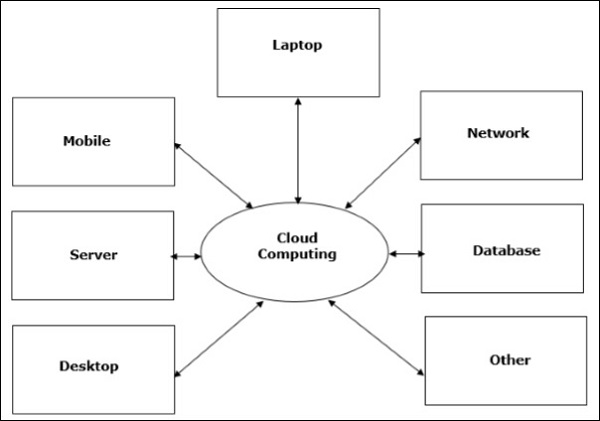
  • The popular trend in today's technology driven world is ‘Cloud Computing’. Cloud computing can be referred to as the storing and accessing of data over the internet rather than your computer's hard drive. This means you don't access the data from either your computer's hard drive or over a dedicated computer network (home or office network). Cloud computing means data is stored at a remote place and is synchronized with other web information.
  • One prominent example of cloud computing is Office 365 which allows users to store, access, edit their MS Office documents online (in browser) without installing the actual program on their device.

Cloud Computing

Architecture of Cloud Computing

  • The architecture of cloud computing comprises of the following components −
  • Front-end device
  • Back-end platform
  • Cloud-based delivery
  • Network
  • Front-end Devices − These are basically the devices that are used by clients to access the data or program using the browser or special applications.
  • Back-end Platform − There are various computers, servers, virtual machines, etc. that combine to become a back-end platform.
Youtube Channel Image
Nadaipazhagu Tamizhaa Subscribe To watch Videos
Subscribe