Showing posts with label Networking Technology. Show all posts

Monday, August 25, 2025

Basic concepts and fundamentals of SELinux : Managing SELinux contexts for files, SELinux commands

Security Enhanced Linux (SELinux) is a security feature developed by the U.S. National Security Agency (NSA) with help from other organizations and the Linux community to provide advanced security controls for Linux systems.

DAC V/s MAC

SELinux uses Mandatory Access Control (MAC). MAC differs from the standard Linux Discretionary Access Control (DAC). DAC includes standard file and directory permissions, access control lists (ACLs), and other user privileges. MAC adds extra protection by controlling what users or processes can access and do with the resources they access. It limits potential damage in the event of a security breach. With MAC, the security controls are precise. For example, if an attacker compromises the HTTP service, he can access only the files the HTTP process can reach, not other processes or files on the system. To enforce this control, MAC creates rules called policies that check the security settings of users and resources whenever access is requested. It stores these settings as labels.

Terminology

SELinux uses complex terminology. The following table outlines the essential terms necessary to understand SELinux concepts and functions.

SubjectA subject is a user or process that accesses an object.
ObjectAn object is a resource that the subject accesses.
AccessAn access is an action the subject performs on an object.
PolicyA policy defines the actions the subject can perform on the object.
ContextA context stores security attributes for subjects and objects.
LabelingLabeling is a process of mapping subjects and objects with their contexts.

Role

A role is an attribute. It defines who (subject) can access what (domains or types). SELinux authorizes users for roles, and roles authorizes domains and types. Each subject has an associated role to ensure that the system and user processes are separated. A subject can transition into a new role to gain access to other domains and types.

Type

A type is a group of objects based on uniformity in their security needs. SELinux groups files and directories with similar security requirements in the same type.Domain

A domain specifies the type of access that a process has. SELinux groups processes with similar security requirements within a specific domain type and runs them in a confined manner within that domain.

Access Vector Cache (AVC)

SELinux uses an Access Vector Cache (AVC) to improve performance. When a subject makes an access request for an object, SELinux checks its policy and, based on it, allows or denies the request. SELinux saves this access decision in AVC. If the same subject makes the same access request, SELinux uses AVC to make its decision. It checks SELinux policy only when the action is not available in AVC.

SELinux Users

SELinux users are predefined user accounts in the SELinux database. SELinux authorizes each SELinux user account for specific tasks. A SELinux user account can perform only the delegated tasks, nothing extra. SELinux users are different from standard Linux users. If implemented, Linux maps standard users to SELinux users. After that, standard users can perform only the actions authorized for the mapped SELinux users. For example, the default file permission allows a user to create new files in their home directory and the root partition. If we map it to a SELinux user account that is authorized to create files only in its home directory, the user cannot create files in the root partition, even if he has permission to do so.

Standard Linux users
  • Each user has a unique identity.
  • We can track and monitor each user account separately.
  • These user accounts have login capability. We use them to access the local system.
  • We create, delete, and manage these accounts as per our requirements.
SELinux users
  • SELinux users are role-based.
  • They are pre-created. We cannot create or delete them.
  • We can not use these accounts directly. These accounts do not have login capability.
  • Unless we map an SELinux user to a standard Linux user, it cannot perform any actions.
  • After mapping, it allows the linked user to perform only the authorized actions.
  • We can map a SELinux user with multiple standard Linux users.

Viewing SELinux users

The seinfo command with the -u option lists all SELinux users.

#seinfo -u

the seinfo command

To view the mapping between Linux and SELinux users, use the following command.

#semange login -l

the semanage command

The seinfo and semanage commands are part of the setools-console package. You must install this package to use these commands.

The setools-console package

SELinux management is complex. The setools-console package simplifies it. It provides commands for all essential SELinux management tasks. However, it is not part of the default SELinux installation. We must install it before we use it. The following command installs it.

#dnf install setools-console

Viewing SELinux contexts

Each SELinux context consists of a subject, an object, a type or domain, and a security level. The -Z option shows SELinux contexts. Use it with the id command to view SELinux contexts for user accounts. For example, the following command shows SELinux contexts for the current user account.

#id -Z

the id command

Use the -Z option with the ls command to view the SELinux contexts of the files and directories.

#ls -Z

the ls command

To view the SELinux contexts of running processes, use it with the ps command.

#ps -eZ

the ps command

Managing SELinux contexts for files

If implemented, SELinux labels all files, processes, and users with contexts. When a user or process accesses a file, it finds the file's type in the allowed file type contexts of the user or process. If the user or process is authorized to access this file type, SELinux lets it access the file. If not, it denies the access request. Since it works over the standard file permissions, no matter what file permissions the user or process has, it cannot access the file. SELinux assigns contexts to a new file from its parent directory.

  • If we copy the file to a new directory, the copied file receives its context from the destination directory.
  • If the destination directory already has a file with the same name and we overwrite it, the new file gets the contexts of the existing file.
  • If we move the file to a new directory, the moved file retains its context.
  • If we archive the file with the tar utility, its context is removed.
  • If we extract an archive, the extracted files get their context from the directory in which they are extracted.
  • The --preserve=context option preserves the context. If we use it with copy operation, the copied file retains its original context. If we use it with the tar command, it keeps the existing context.


"This Content Sponsored by SBO Digital Marketing.

Mobile-Based Part-Time Job Opportunity by SBO!

Earn money online by doing simple content publishing and sharing tasks. Here's how:

  • Job Type: Mobile-based part-time work
  • Work Involves:
    • Content publishing
    • Content sharing on social media
  • Time Required: As little as 1 hour a day
  • Earnings: ₹300 or more daily
  • Requirements:
    • Active Facebook and Instagram account
    • Basic knowledge of using mobile and social media

For more details:

WhatsApp your Name and Qualification to 7338068894

a.Online Part Time Jobs from Home

b.Work from Home Jobs Without Investment

c.Freelance Jobs Online for Students

d.Mobile Based Online Jobs

e.Daily Payment Online Jobs

Keyword & Tag: #OnlinePartTimeJob #WorkFromHome #EarnMoneyOnline #PartTimeJob #jobs #jobalerts #withoutinvestmentjob"


Thursday, August 21, 2025

Basic concepts and fundamentals of ACLs : Routing process, Inbound and Outbound ACLs, ACL correct direction,

This tutorial explains the basic concepts and fundamentals of access control lists. Learn the factors that affect ACL implementation, such as location, direction, order, inbound, and outbound.

An access control list (ACL) is a set of statements. Each statement consists of criteria and actions. Criteria define the conditions for the actions. When the defined conditions are matched, the related actions are executed. Routers use ACLs to filter packets. When a packet enters or exits the router, the router checks the statements of the applied ACL in sequential order to find a match. If the router finds a match, the router executes the corresponding action. If the router does not find a match, the router discards the packet.


An ACL works only if it is applied to the correct interface in the correct direction. In this part, we will discuss the factors that affect ACL implementation.

This tutorial is the second part of the article 'Cisco Access Lists Explained with Examples.'. Other parts of this article are the following.

Location

Access lists are applied to interfaces. For example, if a router has two interfaces, you can apply different access lists to both interfaces. An interface can only use its ACL to filter the traffic that passes through it. It can't use the ACL of the other interface. If you apply an ACL to an interface that does not process targeted traffic, that ACL will not work.

An ACL acts as a sieve. Just as a sieve uses its mesh to filter out liquid or small particles from a mixture, an ACL uses its statements to filter out the desired packets. A sieve can filter the mixture only when you pass the mixture through it. Similarly, an ACL can filter traffic only if traffic is processed through it.

Let's understand this through an example. The following image shows a simple network.

ACL example network

In this network, three segments are connected through the router. Without any ACL, all segments can access each other. Now, the administrator wants to prevent the Staff segment from accessing the Server segment. For this, he created an ACL and applied it to the F0/1 interface. The following image shows this implementation.

Will this ACL work?

No, instead of blocking the Staff segment, this ACL will block the Administrators segment. The F0/1 interface connects the Administrators segment to the Server segment. To access the Server segment, the traffic of the Staff segment neither enters nor exits from the F0/1 interface. Since the traffic of the Staff segment does not interact with the F0/1 interface, the ACL applied to the F0/1 interface does not affect it.

Now you know how the location of the ACL affects the ACL implementation.

Can you guess the correct location for this ACL?

You can apply this ACL to either the F0/0 interface or the F0/2 interface. The following image shows the correct implementation of the ACL.

Correct implementation of the ACL

When implementing an ACL on an interface, make sure that the interface interacts with the targeted traffic. If the targeted traffic does not pass through it, the ACL will not work.

Direction

When a router receives a packet on its interface, it reads the destination address of the packet and forwards the packet from the interface that is connected to the destination address.

We can divide this process into three phases. These phases are entry, process, and exit. In the first phase, the packet enters the router. In the second phase, the router processes the packet. In the third phase, the packet exits the router.

Routing process

We can apply an ACL before the first phase and the third phase. If we apply the ACL before the first phase, the router will process the incoming packets through the ACL. If we apply the ACL before the third phase, the router will process the outgoing packets through the ACL. We can’t apply an ACL before and after the second phase.

Inbound and Outbound ACLs:

If you use an ACL to filter incoming traffic, it is called an inbound ACL. If you use an ACL to filter outgoing traffic, it is called an outbound ACL. An inbound ACL cannot filter the outgoing traffic, whereas an outbound ACL cannot filter the incoming traffic.

Let's take our example back to understand the effect of the direction on the ACL. To prevent the Staff segment from accessing the Server segment, the administrator applied the outbound ACL to the F0/0 interface.

Although the administrator has applied the ACL to the F0/0 interface, the Staff segment can still access the Server.

Can you guess what's wrong with this implementation?

The following image shows the new ACL implementation.

acl wrong direction

The F0/0 interface is the default gateway of the Staff segment. It receives traffic from the Staff segment and forwards it to the Server segment. The F0/0 interface is the entry point of traffic.

The administrator applied the outbound ACL to filter the incoming traffic. The traffic of the Staff segment enters the F0/0 interface. There does not exist F0/0 interface. An outbound ACL can't filter the incoming traffic.

The administrator can fix this problem in two ways. He can apply an inbound ACL to the F0/0 interface, or he can apply an outbound ACL to the F0/2 interface. The following image shows the first solution.

ACL correct direction

Order

Once the access list is implemented, the router processes each packet through the access list. For each packet, the router checks each entry in the access list from top to bottom until a match is found. Once a match is found, the router executes the corresponding action. It does not check the remaining entries for that packet. If an access list has multiple entries for the same packet, the router will only execute the action of the first entry from the top.

If you want to allow only some hosts from a network, you should add the allow statements first in the ACL. If you add an allow statement below the deny statement of the same criteria, the allow statement will never execute.

Let's understand it through our example. The administrator wants to allow only the host 10.0.0.10/8 from the 10.0.0.0/8 network to access the Server segment. For this, he created the following ACL.

Deny all

Allow 10.0.0.10/8

The administrator applied this ACL to the F0/0 interface in the inbound direction. Afterward, all traffic from the Staff section has blocked. Even the host 10.0.0.10/8 has an allowed entry, still the host can't access the Server segment.

Can you guess why this ACL is not working?

The following image shows this ACL implementation.

wrong order

When the packets from the host 10.0.0.10 enter the F0/0 interface, the interface checks the applied ACL. The first statement of the ACL says "deny all incoming traffic". Since this criterion matches all incoming packets, the interface never checks the next statement for any incoming packet. It always executes the action of the first statement. Since the action of the first statement is the 'deny all', all incoming packets are denied.

To fix this issue, the administrator needs to put the allowed statement before the deny statement. The correct ACL is the following.

Alw 10.0.0.10/8

Deny all

The following image shows the implementation of the correct ACL.

Now, when packets from the host 10.0.0.10/8 enter the F0/0 interface, the interface will allow them. But if it receives packets from other hosts, it will discard them. Let's understand why this will happen.

When a packet enters the interface, the interface checks the ACL. The first statement of the ACL is for the host 10.0.0.10/8. The interface will check the source address of the packet. If the source address of the packet is 10.0.0.10/8. The interface will execute the action of the first statement. The action of the first statement is 'allow'. Because of this, the packet will be allowed.

If the source address of the packet is not 10.0.0.10/8, the interface will check the next statement. The next statement is 'deny all'. This will match all incoming packets. The action of the second statement is 'deny all'. Because of this, the packet will be discarded.

Thus, apart from the packets of the host 10.0.0.10/8, all incoming packets will be discarded.


"This Content Sponsored by SBO Digital Marketing.

Mobile-Based Part-Time Job Opportunity by SBO!

Earn money online by doing simple content publishing and sharing tasks. Here's how:

  • Job Type: Mobile-based part-time work
  • Work Involves:
    • Content publishing
    • Content sharing on social media
  • Time Required: As little as 1 hour a day
  • Earnings: ₹300 or more daily
  • Requirements:
    • Active Facebook and Instagram account
    • Basic knowledge of using mobile and social media

For more details:

WhatsApp your Name and Qualification to 7338068894

a.Online Part-Time Jobs from Home

b.Work from Home Jobs Without Investment

c.Freelance Jobs Online for Students

d. Mobile-Based Online Jobs

e.Daily Payment Online Jobs

Keyword & Tag: #OnlinePartTimeJob #WorkFromHome #EarnMoneyOnline #PartTimeJob #jobs #jobalerts #withoutinvestmentjob"


Thursday, August 14, 2025

STP/RSTP Timers Explained : Hello Timer, Max-Age Timer, Forward delay, Differences between STP, RSTP, PVST, RPVST, and MSTP

STP/RSTP uses three timers for its functions. These timers control and define the time STP needs to reach convergence. These timers are Hello, Max age, and Forward delay. The root bridge dictates these timers in BPDUs. The following table lists these timers.

TimerDefault ValueDescription
Hello2 secondsThis is the interval between two consecutive BPDUs.
MaxAge10 times HelloThis is the maximum time a switch waits for a BPDU before changing the STP topology.
Forward delay15 secondsThis is the time the switch keeps ports in learning and listing states.

Let us understand the above timers in detail.

Hello Timer:

Switches use BPDU (Bridge Protocol Data Unit) messages to communicate and share STP (Spanning Tree Protocol) information. A BPDU message contains all the information that STP requires to build and maintain its topology. All STP-running switches broadcast a BPDU at a fixed interval. The Hello-timer defines this interval. The default value of this timer is two seconds. Therefore, all STP-running switches broadcast a BPDU every two seconds.

Max-Age Timer:

As long as a switch receives a BPDU every two seconds from its neighbors, it operates normally. However, if it does not receive a BPDU from the neighbor within MaxAge time, the switch reacts by taking steps to change the STP topology. The default value of this timer is ten times the Hello timer. Since the default value of the hello timer is 2 seconds, the default value of it will be 20 seconds (2 * 10 = 20). So, a switch would wait 20 seconds without hearing a Hello BPDU before reacting.

Forward delay:

Switches use this timer to age out old entries from the CAM table and add new entries. The switch uses CAM table entries to make forwarding decisions. When a network change occurs, CAM table entries become invalid. The switch can not use the existing entries to make forwarding decisions. It must flush the existing entries and learn them again to make forwarding decisions. The switch completes these tasks in the Forward delay time. The default forward delay time is fifteen seconds. STP uses fifteen seconds to flush old entries. It uses the Listening state for this. It takes another fifteen seconds to learn and add new entries to the CAM table. It uses the Learning state for this.

Viewing the STP timer

You can use the show spanning-tree command to view the STP timer values.

show spanning tree command

Similarities between STP, RSTP, PVST, RPVST, and MSTP

The following are the similarities between STP, RSTP, PVST, RPVST, and MSTP. 

  • All create and use a virtual topology to find switching loops in every VLAN.
  • All elect a root bridge and use it as the focal point of the virtual topology.
  • All use the same rules and tiebreakers for the root bridge election.
  • Besides the root bridge, all remaining switches become non-root bridge switches.
  • All select only one root port to reach the root bridge.
  • All use the same rules and tiebreakers to select the root port.
  • All select only one designated port for every local segment or end device.
  • All use the same rules and tiebreakers to select the designated port.
  • After selecting root and designated ports, they block all remaining ports to remove loops.
  • All variations run all ports through a few states. During these states, they learn the network topology, flush CAM table entries, select root and designated ports, and block the ports causing the loops.

Differences between STP, RSTP, PVST, RPVST, and MSTP

The main reason for creating RSTP/RPVST was the convergence. Convergence is the time STP takes to react to a network change. STP/PVST takes a relatively long time for convergence. With default settings, it takes 50 seconds to reach convergence. RSTP/RPVST/MSTP improves it. It reaches convergence within a few seconds (or in slow conditions, in about 10 seconds).

It adds two new port types for rapid convergence. These port types are alternative and backup ports. It uses the alternative port to reach the root bridge if the link connected to the root port fails. It uses the backup port to reach the local segment when the link connected to the designated port fails.

Since it has an alternative or backup port, it does not have to reselect the root or designated ports when a network change occurs. If the root path fails, it enables the alternative port within a few seconds. If the designated path fails, it enables the backup port. It means if the network is running RSTP/RPVST/MSTP, it has to wait a maximum of 10 seconds whenever a change occurs.

STP/PVST does not have a concept of alternative and designated ports. If the root or designated path fails, it reruns the entire process to select the new root or designated ports. Running the entire process again takes 50 seconds. It means if the network is running STP, it has to wait for 50 seconds whenever a change occurs.

RSTP/RPVST/MSTP does not use the learning state. It also renames the blocking state to the discarding state and redefines its use slightly. It combines disabled and blocking states into the discarding state. In the disabled state, the port can work physically, but it can not forward user frames. It simply meant that the interface was administratively disabled.

Conclusion:

There are three STP timers: Hello, Max age, and forward delay. Hello timer defines the interval between BPDUs. The Max age timer defines the switch's wait before rebuilding the STP topology when it does not receive BPDUs from its neighbors. STP uses the forward delay timer to rebuild the CAM table entries. It uses this timer for two states: Listening and Learning. In the Listening state, it ages out old entries. In the Learning state, it adds new entries to make forwarding decisions.

===============================================================


"This Content Sponsored by SBO Digital Marketing.

Mobile-Based Part-Time Job Opportunity by SBO!

Earn money online by doing simple content publishing and sharing tasks. Here's how:

  • Job Type: Mobile-based part-time work
  • Work Involves:
    • Content publishing
    • Content sharing on social media
  • Time Required: As little as 1 hour a day
  • Earnings: ₹300 or more daily
  • Requirements:
    • Active Facebook and Instagram account
    • Basic knowledge of using mobile and social media

For more details:

WhatsApp your Name and Qualification to 8489257126

a.Online Part Time Jobs from Home

b.Work from Home Jobs Without Investment

c.Freelance Jobs Online for Students

d.Mobile Based Online Jobs

e.Daily Payment Online Jobs

Keyword & Tag: #OnlinePartTimeJob #WorkFromHome #EarnMoneyOnline #PartTimeJob #jobs #jobalerts #withoutinvestmentjob"

==========================================================================

Monday, July 21, 2025

How the Internet Works :What Is the Internet? IP Addresses and DNS, How Data Travels Across the Internet, Internet Infrastructure and ISPs

The internet is a vast network that connects billions of devices worldwide, enabling communication, commerce, education, and entertainment. Although it may seem simple on the surface—click a link and a website appears—the behind-the-scenes processes are intricate and fascinating. This article explores the inner workings of the internet under seven key headings.


What Is the Internet?

The internet is a global network of interconnected computers and servers. It uses standardized communication protocols to enable devices to "talk" to each other. Think of it as a digital highway system where data (information) is constantly traveling from one place to another.

The internet itself is not the web—the World Wide Web (WWW) is just one of many services (like email, file transfer, or video streaming) that run on the internet. At its core, the internet is a physical infrastructure made up of fiber-optic cables, routers, servers, satellites, and wireless signals.

IP Addresses and DNS

Every device on the internet has a unique identifier known as an IP address (Internet Protocol address), similar to a home address. IP addresses allow data to be sent and received correctly.

Since IP addresses are complex (like 192.168.1.1), we use domain names (like google.com) to make it easier for humans. The Domain Name System (DNS) acts like a phonebook that translates domain names into IP addresses.

For example:

You type www.google.com

DNS finds the IP address (like 142.250.190.4)

Your computer connects to that address to retrieve the website

How Data Travels Across the Internet

Data on the internet travels in small units called packets. When you send an email or stream a video, your data is broken into these packets, which travel across the network separately and are reassembled at the destination.

The journey of each packet involves:

Routers, which direct packets toward their destination.

Switches, which connect devices within a network.

Cables and satellites, which physically transmit the data.

The internet uses TCP/IP protocols to manage this process. TCP (Transmission Control Protocol) ensures data is sent and received in the correct order, while IP (Internet Protocol) routes the data.

Servers and Clients

The internet functions on a client-server model. A server is a powerful computer that hosts websites, files, or services. A client is a device (like your phone or laptop) that accesses the server.

Here’s what happens when you visit a website:

Your device (client) sends a request to the web server

The server processes the request and sends back the needed data

Your web browser displays the information

This back-and-forth happens in milliseconds and is repeated millions of times every second around the globe.

Web Browsers and HTTP

A web browser (like Chrome, Firefox, or Safari) is software that retrieves and displays content from the web. It uses HTTP (Hypertext Transfer Protocol) or its secure version, HTTPS, to communicate with servers.

When you enter a website URL:

The browser checks DNS to get the IP address

It sends an HTTP request to that IP address

The server responds with HTML, CSS, images, or videos

The browser renders the page for you to see

HTTPS adds an extra layer of security by encrypting data, preventing hackers from intercepting sensitive information like passwords or credit card numbers.

Internet Infrastructure and ISPs

Behind the scenes, the internet is powered by a combination of hardware infrastructure and Internet Service Providers (ISPs).

ISPs, such as Comcast, AT&T, or Airtel, are companies that connect you to the internet.

Data centers are huge facilities filled with servers that store and distribute content.

Undersea cables stretch across oceans to connect continents.

Internet exchange points (IXPs) allow ISPs to share traffic directly.

All of this is overseen by organizations like:

ICANN (assigns domain names)

IETF (develops protocols)

W3C (sets web standards)

Security, Privacy, and the Future

As more of our lives move online, internet security and privacy have become vital. Technologies like:

Encryption (scrambles data to prevent theft)

Firewalls (block unauthorized access)

VPNs (hide your online identity)

...all help protect users from cyber threats.

The future of the internet includes:

5G and beyond, for faster mobile connections

IoT (Internet of Things), connecting everyday devices like fridges and watches

AI-driven networks, optimizing speed and efficiency

Decentralized web (Web3), aiming to give users more control over their data

But challenges remain, such as:

Digital divide (lack of access in some areas)

Censorship and surveillance

Cybercrime and misinformation

Conclusion

The internet is an incredible system made up of complex layers of technology and cooperation. From sending a simple email to streaming global content in real-time, it's all powered by a network of devices, protocols, and infrastructure that work silently behind the scenes. Understanding how it all functions helps us use it more wisely, securely, and effectively.


===============================================================
"This Content Sponsored by Buymote Shopping app

BuyMote E-Shopping Application is One of the Online Shopping App

Now Available on Play Store & App Store (Buymote E-Shopping)

Click Below Link and Install Application: https://buymote.shop/links/0f5993744a9213079a6b53e8

Sponsor Content: #buymote #buymoteeshopping #buymoteonline #buymoteshopping #buymoteapplication"
==============================================================

Monday, June 9, 2025

Network Marketing Strategies for Beginners: Start with the Right Mindset, Choose the Right Company, Master the Product First

Network marketing, also known as multi-level marketing (MLM), is a business model where individuals earn income through direct sales and by recruiting others to do the same. While it promises financial freedom and flexible schedules, succeeding in network marketing requires strategy, patience, and a commitment to personal growth. If you're a beginner, the following strategies will help you build a solid foundation for long-term success.

Start with the Right Mindset

One of the most important elements of success in network marketing is developing the right mindset. Many beginners expect fast results and become discouraged quickly. However, network marketing is not a get-rich-quick scheme—it’s a business that takes time to grow.


You must approach it with a mindset of service, consistency, and personal development. Be ready to handle rejection and stay focused on your goals. Understand that growth is a process. The more you invest in yourself through books, podcasts, training, and mentorship, the better equipped you’ll be to lead others.

Tip: Practice daily affirmations and visualization techniques to stay motivated and aligned with your long-term vision.

Choose the Right Company

Not all network marketing companies are created equal. As a beginner, it’s crucial to do your due diligence before joining one. Look for a company with:

A high-quality, in-demand product or service

A fair and transparent compensation plan

A strong leadership team and ethical business practices

Positive customer and distributor reviews

Joining a company that aligns with your values and passions will make it easier to genuinely share and promote the products.

Tip: Avoid companies that prioritize recruitment over product value—they may be disguised pyramid schemes.

Master the Product First

Before you start selling or recruiting, become a true product user. Your own experience and results are your most powerful marketing tools. People trust personal stories more than sales pitches. When you talk about how the product helped you or someone close to you, it builds credibility and interest.

You should be able to confidently explain what the product does, how it works, and why someone should use it. Understanding the benefits, ingredients (if applicable), pricing, and competitive advantage gives you an edge in every conversation.

Tip: Make a list of product features and pair them with customer benefits. Practice explaining them clearly and simply.

Build and Leverage Your Network

Network marketing is all about relationships. Start by making a list of everyone you know—family, friends, coworkers, neighbors, and acquaintances. This is called your “warm market.” Reach out with sincerity, not desperation. Focus on building conversations, not just closing sales.

As you grow, expand into your “cold market”—people you haven’t met yet. Attend networking events, join social media groups, participate in community activities, or even use online platforms like LinkedIn, Facebook, or Instagram to meet new people.

Tip: The goal is not to sell, but to connect, share value, and build trust. Consistent follow-ups are key—most people don’t buy on the first contact.

Use Social Media Wisely

Social media is a powerful tool for network marketers, but it needs to be used strategically. Avoid turning your feed into a product catalog. Instead, focus on creating a personal brand that reflects your values, lifestyle, and story.

Share content that educates, entertains, or inspires. Post testimonials, behind-the-scenes glimpses of your journey, tips related to your product niche, and personal development lessons. Use a mix of posts, stories, and reels to stay visible and engaged with your audience.

Tip: Always lead with value. Be authentic and avoid over-hyping your results or income. Trust and credibility take time to build.

Duplicate and Mentor Your Team

In network marketing, long-term success doesn’t come just from your own sales—it comes from building a strong team. Once you’ve gained some experience and confidence, start mentoring new recruits. Teach them the same skills that helped you succeed.

Keep things simple. Create easy-to-follow systems for onboarding, training, and daily activities. Help your team stay motivated and connected through regular check-ins, group calls, or recognition programs.

Remember, your success is directly tied to how well your team performs. Leadership, communication, and empathy are essential qualities for creating a positive and productive team culture.

Tip: Focus on helping your team members achieve their goals, and your own success will naturally follow.

Final Thoughts

Network marketing offers an incredible opportunity for personal and financial growth, but it requires genuine effort and a willingness to learn. As a beginner, focus on building relationships, developing your skills, and serving others. With patience and consistency, you can create a thriving business and positively impact the lives of those around you.

=================================================================

"This Content Sponsored by Buymote Shopping app

BuyMote E-Shopping Application is One of the Online Shopping App

Now Available on Play Store & App Store (Buymote E-Shopping)

Click Below Link and Install Application: https://buymote.shop/links/0f5993744a9213079a6b53e8

Sponsor Content: #buymote #buymoteeshopping #buymoteonline #buymoteshopping #buymoteapplication"

======================================================================

Thursday, June 5, 2025

Understanding Telecommunications Networks: The Backbone of Modern Communication, Understanding Telecommunications Networks: The Backbone of Modern Communication

Introduction

        Telecommunications networks are the lifeline of today’s digital society. They facilitate the transmission of voice, data, video, and multimedia across distances, enabling seamless communication on a global scale. From phone calls to video conferencing, social media browsing to real-time gaming, these networks form the invisible backbone that connects people and devices. With the rapid evolution of technology and increasing demand for high-speed connectivity, telecommunications networks have expanded and diversified into various sophisticated forms, including cellular networks, fiber optics, and satellite communications.

Historical Evolution of Telecommunications

        The journey of telecommunications began with the invention of the telegraph in the 19th century, allowing messages to be sent over long distances using coded signals. This was followed by the telephone, which enabled voice communication. The 20th century saw the rise of radio and television broadcasting, transforming mass communication. The advent of the internet in the late 20th century marked a revolutionary leap, integrating data and voice services over IP-based networks. The evolution continued into the 21st century with the rise of mobile networks and high-speed fiber optics, paving the way for a hyper-connected world.


Cellular Networks: From 1G to 5G and Beyond

        Cellular networks divide geographical areas into cells, each served by a base station that connects mobile users to the wider network. First-generation (1G) networks introduced analog voice communication. 2G brought digital voice and SMS, while 3G enabled mobile internet access. The launch of 4G networks revolutionized mobile broadband, offering high-speed internet suitable for HD video streaming and gaming. The latest development, 5G, offers ultra-low latency, massive device connectivity, and extremely high data rates. It supports advanced technologies like autonomous vehicles, smart cities, and augmented reality. The future, possibly marked by 6G, promises even more immersive and intelligent communication capabilities.

Fiber Optic Networks: The Speed Highway

        Fiber optics technology uses light to transmit data through thin strands of glass or plastic fibers. Unlike traditional copper cables, fiber optics offer significantly higher bandwidth and longer-distance transmission without signal degradation. This makes them ideal for high-speed internet, enterprise networks, and backbone infrastructure for ISPs and data centers. Fiber-to-the-home (FTTH) services are increasingly common in urban areas, delivering gigabit-speed internet to residential users. As demand for bandwidth-intensive services like 4K streaming and cloud computing grows, fiber optics continue to be at the forefront of network infrastructure development.

Satellite Communication: Reaching the Unreachable

        Satellites play a crucial role in providing communication services to remote and underserved regions where terrestrial infrastructure is not viable. Traditional geostationary satellites provide coverage over large areas but often suffer from latency issues due to their high altitude. Modern advancements include low Earth orbit (LEO) satellites, such as those deployed by companies like SpaceX (Starlink) and OneWeb. These satellites offer lower latency and improved performance, making satellite internet a competitive option even in developed markets. Satellite communication also supports GPS, weather forecasting, and global broadcasting.

Network Infrastructure: The Physical and Logical Foundations

        The effectiveness of telecommunications networks depends heavily on robust infrastructure. Physical components include cell towers, base stations, fiber optic cables, satellite ground stations, and data centers. Logical infrastructure involves network management systems, switching and routing mechanisms, and cybersecurity frameworks. As networks become more complex, software-defined networking (SDN) and network function virtualization (NFV) are gaining prominence, allowing for more flexible and efficient network management. The convergence of IT and telecom infrastructure is key to supporting next-generation services like IoT and edge computing.


7. Real-World Applications and Future Outlook

Telecommunications networks have become integral to nearly every aspect of modern life. Mobile networks support communication and commerce on the go, while fiber optics power business operations and cloud computing. Satellite systems ensure connectivity in disaster zones and remote areas. Looking ahead, the continued rollout of 5G and future 6G networks will unlock new possibilities in automation, virtual collaboration, and digital health. Governments and private sectors are investing heavily in expanding and upgrading network infrastructure, recognizing its critical role in economic growth and societal development. The future of telecommunications lies in its ability to adapt, integrate, and innovate in response to evolving human and technological needs.

Conclusion

        Telecommunications networks have transformed from simple wired connections to complex ecosystems of wireless, optical, and satellite technologies. They enable real-time global communication and are the foundation of digital transformation across industries. As we move deeper into the digital age, investing in and understanding telecommunications infrastructure is vital to ensuring a connected, efficient, and inclusive future.


==================================================

"This Content Sponsored by Buymote Shopping app

BuyMote E-Shopping Application is One of the Online Shopping App

Now Available on Play Store & App Store (Buymote E-Shopping)

Click Below Link and Install Application: https://buymote.shop/links/0f5993744a9213079a6b53e8

Sponsor Content: #buymote #buymoteeshopping #buymoteonline #buymoteshopping #buymoteapplication"

======================================================================

Monday, May 19, 2025

Cybersecurity: Meaning & Definition, Why is cybersecurity important? Cybersecurity challenges, Types of Cybersecurity Solutions

Cybersecurity is the combination of methods, processes, tools, and behaviors that protect computer systems, networks, and data from cyberattacks and unauthorized access. Although deeply rooted in technology, the effectiveness of cybersecurity also very much depends on people.

Human error, negligence, or lack of awareness can create vulnerabilities that cybercriminals exploit. By following best practices, staying informed, and adhering to security protocols, individuals play a crucial role in preventing breaches and keeping computer systems safe.

Why is cybersecurity important?

The rapid pace of digital transformation has changed how organizations conduct business and how people shop, work, and communicate, with e-commerce, remote collaboration, and cloud data storage becoming cornerstones of modern life. Beyond personal and business usage, critical infrastructure like gas pipelines, electrical grids, and other essential services are now managed online, making them vulnerable to cyberattacks.

As organizations and consumers increasingly entrust sensitive information to digital systems, the need for robust cybersecurity measures has never been greater. They not only protect this data, but also ensure the safety and reliability of services that power countless lives daily.

Monday, February 17, 2025

DHCP Guide : The background,The DHCP Process,Central DHCP Server,Local DHCP Server

            This document describes common scenarios for implementing DHCP in relation to PXE boot, focusing on Configuration Manager.

The audience must be familiar with basic IP networking principles.

The background:


            For a client to perform a PXE boot, there must be a DHCP service available, this is not required to be a Microsoft DHCP service. Any DHCP server is good.

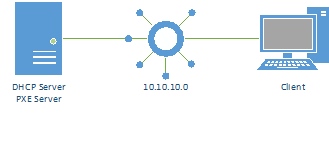
The following diagram shows a typical network setup

In this case the client and the server are on the same network, which is the simplest setup you will come across, normally the setup will be more advanced, but to explain the basics, we will start with this simple model.

The DHCP Process:


            During a normal DHCP process, the following happens:

  1. The client sends out a DHCP broadcast on the network
  2. The broadcast is picked up by the server
  3. The server replies with a broadcast containing the MAC address of the client and a suggested IP address
  4. The client replies back to the server, indicating that it will use the provided address

The PXE Boot process:

Youtube Channel Image
Nadaipazhagu Tamizhaa Subscribe To watch Videos
Subscribe